Upload IGC, analyze flights, done.

ParaBook combines upload, automatic analysis, map, logbook and statistics in one clear interface.

Simple by design: focused on your flight data, not on hype.

Logbook and flight detail

Sortable history with segment/scoring analysis, detail editors, and IGC download.

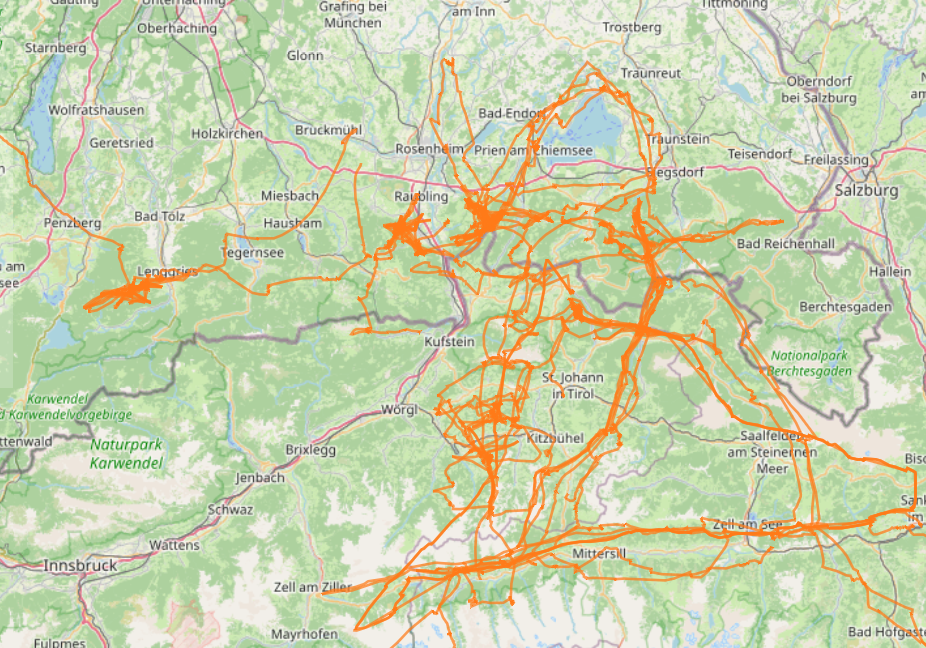
Interactive map with filters

Overlay all processed flights with filters for date, distance, duration and takeoff.

Upload and batch management

Upload multiple IGC files at once, track progress, and detect duplicates automatically.

Map

Tracks in overlayShow all your tracks on one map at once, so you always know where you have already flown.

Logbook

History and detailsIn the logbook you can browse your full history with flight details and fast filters.

Statistics

Time, distance, glidersStats give you a clear view of airtime, distance, and glider usage over time.

How it works

Typical flow from raw file to usable flight history.

1

1. Upload

Upload IGC files in batches with resumable handling and per-file status.

2

2. Automatic analysis

Your flights are analyzed automatically: distance, duration, takeoff and key metrics are prepared.

3

3. Analyze

Map, logbook, detail analysis and stats all use the same processed data foundation.

Core features

All currently available core capabilities in one overview.

Logbook and flight detail

Sortable history with segment/scoring analysis, detail editors, and IGC download.

Interactive map with filters

Overlay all processed flights with filters for date, distance, duration and takeoff.

Upload and batch management

Upload multiple IGC files at once, track progress, and detect duplicates automatically.

Automatic processing

After upload, distance, duration, takeoff, scoring and key metrics are available right away.

XC Planner

Plan routes, set turnpoints, view thermals/skyways/airspaces, and save your own routes.

Task and waypoint editor

Build tasks and waypoints on map, import CUP/GPX/WPT, and save your own tasks (Premium).

Equipment management

Track wings, harnesses, reserves and instruments with service intervals, airtime and setup links.

Statistics

Time series, glider and takeoff analysis, plus year-over-year comparisons.

Feature/bug requests

Submit feedback in-app and track status updates with threaded comments.

Views

Representative UI areas available after sign-in.

Flight Logbook

Search flights, filter by takeoff, glider, date and score type, and jump straight into flight details.

Filtered map

Render multiple tracks together and narrow the data set to the flights that matter.

Flight detail & export

Track rendering with segment logic, score types and social-media export graphics.

Upload history

Batch list with per-file states, error codes and analysis progress.

Competition overview with WPRS forecast

Track CIVLComps, Airtribune and Swissleague entries with forecast values, your own placement and scoring projections. Optionally delivered by monthly email.

Current WPRS ranking

World rank, country rank for the selected CIVL ID, total points and your four best counted results in one view, with optional monthly email delivery.

Equipment management

Group equipment by type, maintain service logs, and inspect usage from your processed flights.

Task Creator

Build tasks directly on the map, import waypoints, edit turnpoints and store finished tasks in your own task history.

XC route planner

Plan XC routes with turnpoints, FAI sectors and metrics, then save and reopen them from your own route history.

Free vs Premium

Current Free vs Premium differences, feature by feature.

Free

Start for free

Included in Free

  • Upload and flight analysisUpload + automatic analysis
    Available
  • Map filters (date, distance, duration, takeoff)Date, distance, duration, takeoff
    Available
  • XC Planner (route planning, overlays, sharing)Route planning + XCTSK share
    Available
  • Flight detail editors (glider, takeoff, note)Glider, takeoff, note
    Editable
  • Feature/bug requestsSubmit directly in the app
    Available

Limited in Free

  • Saved XC routes in XC PlannerUp to 3 saved XC routes, additional routes are locked
    Reduced
  • Task and waypoint editorUp to 3 saved tasks, additional tasks are locked
    Reduced
  • Map themes in settingsStandard map only
    Standard
  • Map glider filters and glider colorsPremium only
    Premium
  • Track colors by glider (map)Premium only
    Premium
  • Visible flights in logbookLast 25 flights
    Reduced
  • Stats coverageFor the last 25 flights
    Reduced
  • Download original IGC againDownload locked
    Premium
  • Flight-detail map color modesSingle color only
    Reduced
  • Track detail levelBasic track detail (track with 10s sampling)
    Basic

Premium

Most popular

Deeper map, logbook and stats capabilities

Everything in Free:

  • Upload and flight analysisUpload + automatic analysis
    Available
  • Map filters (date, distance, duration, takeoff)Date, distance, duration, takeoff
    Available
  • XC Planner (route planning, overlays, sharing)Route planning + XCTSK share
    Available
  • Flight detail editors (glider, takeoff, note)Glider, takeoff, note
    Editable
  • Feature/bug requestsSubmit directly in the app
    Available

Included in Premium:

  • Saved XC routes in XC PlannerUnlimited saved XC routes
    Full
  • Task and waypoint editorUnlimited saved tasks with CUP/GPX/WPT import and XCTSK export
    Available
  • Map themes in settingsAll map themes
    Available
  • Map glider filters and glider colorsGlider filters + glider colors
    Available
  • Track colors by glider (map)Different color per glider
    Available
  • Visible flights in logbookFull history
    Full
  • Stats coverageFor all flights
    Full
  • Download original IGC againDownload original IGC file
    Available
  • Flight-detail map color modesAll color modes
    Full
  • Track detail levelFiner track detail (track with 1sec sampling)
    Detailed

Start on Free. Upgrade to Premium when needed.

Upgrade any time if you need full history and premium analysis features.